@ebarooni/capacitor-calendar
@ebarooni/capacitor-calendar






@ebarooni/capacitor-calendar connects your Capacitor app to the native calendar. On iOS and Android, create, edit, and list events, and manage calendars and permissions. iOS also supports reminders. On the web, the plugin builds a downloadable .ics file; it does not write to a device calendar.
Table of Contents
- Features and Platforms
- Demo
- Why this plugin?
- MCP Server
- Capacitor Compatibility
- Installation
- Setup
- Error codes
- Quick Start
- Usage Examples
- Documentation
- Changelog
- Breaking Changes
- API
- Contributing
- License
Features and Platforms
| Capability | iOS | Android | Web |
|---|---|---|---|
| Create, update, and delete events | ✅ | ✅ | Create only* |
| Native prompts to create, edit, and delete events | ✅ | ✅ | Create only* |
| List events in a date range | ✅ | ✅ | – |
| Request calendar permissions | ✅ | ✅ | – |
| List, create, modify, and delete calendars | ✅ | ✅ | – |
| Open the native Calendar app | ✅ | ✅ | – |
| Calendar sources and a calendar picker prompt | ✅ | – | – |
| Reminders and reminder lists | ✅ | – | – |
* On the web, createEvent and createEventWithPrompt return a downloadable .ics file. They do not write to a device calendar. See Create and download an event on the web.
Demo
| iOS | Android |
|---|---|
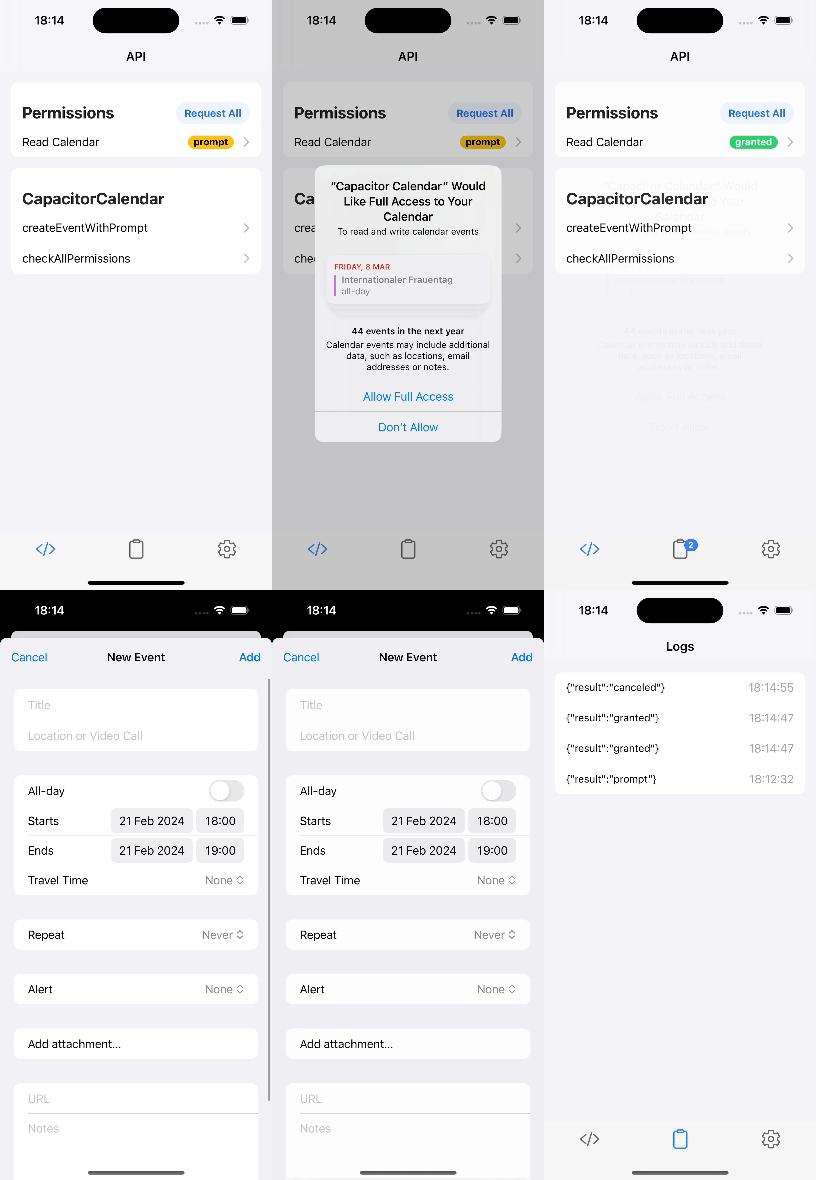 |
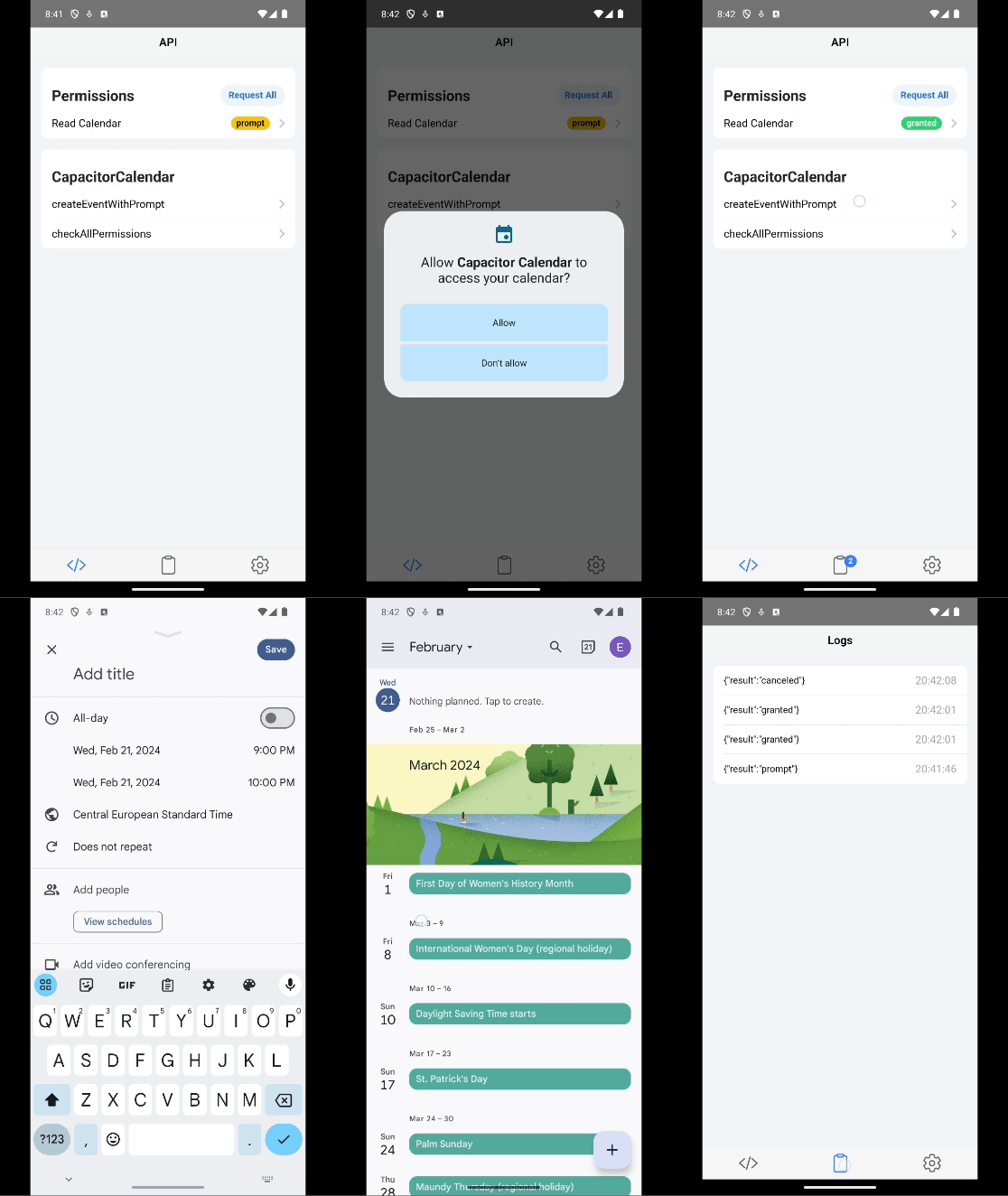 |
Web: Run the example app in a browser. Use Create event or Create event with prompt for .ics export. Unsupported actions are disabled.
Why this plugin?
- Established. Available since Capacitor 5, with years of real-world use behind it.
- Actively maintained. The original author still owns the codebase and ships fixes and features.
- Fast support. Questions and bug reports get quick answers.
- Lower vendor risk. Relying on one plugin author for everything is risky. Independent, focused maintainers keep your stack resilient.
MCP Server
@ebarooni/capacitor-calendar ships an official MCP server. It gives AI coding assistants accurate, grounded knowledge of the plugin.
docker run --rm -d --name capacitor-calendar-mcp -p 8080:8080 ghcr.io/ebarooni/capacitor-calendar-mcp:1.2.0
See mcp/README.md for client configuration and full details.
Capacitor Compatibility
Match the npm tag to your Capacitor major. The latest and latest-7 packages are intended to stay in feature parity.
| Capacitor | npm tag | Version |
|---|---|---|
8.x |
latest |
 |
7.x |
latest-7 |
 |
Installation
Capacitor 8:
npm install @ebarooni/capacitor-calendar
# or: npm install @ebarooni/capacitor-calendar@latest
npx cap sync
Capacitor 7:
npm install @ebarooni/capacitor-calendar@latest-7
npx cap sync
Setup
This plugin works with native calendar APIs, so you need to configure permissions on each platform before you request access at runtime. After setup, see Quick Start to request permissions in code.
Android
Add these permissions to android/app/src/main/AndroidManifest.xml:
Request the matching runtime permissions before you read from or write to the calendar.
iOS
Add the appropriate usage description keys to ios/App/App/Info.plist. Starting with iOS 17, Apple requires separate keys for write-only and full calendar access.
NSCalendarsUsageDescription
This app needs access to your calendar.
NSCalendarsWriteOnlyAccessUsageDescription
This app needs permission to create calendar events.
NSCalendarsFullAccessUsageDescription
This app needs permission to read and manage your calendar events.
NSRemindersUsageDescription
This app needs access to your reminders.
NSRemindersFullAccessUsageDescription
This app needs permission to read and manage your reminders.
Only include the keys your app actually needs. If you only create events, you can omit the full access and reminders entries.
Official References
Error codes
On Android and iOS, a rejected call can expose error.code (stable category) and error.message (exact cause). Compare codes with the exported CapacitorCalendarErrorCode enum. Not every reject has a code yet; later releases add more catalog cases.
Defined codes:
| Code | Name | When |
|---|---|---|
EB-CLDR-0001 |
InvalidArgument |
A required argument is missing or invalid. |
EB-CLDR-0002 |
NotFound |
The requested calendar, event, list, reminder, or calendar source does not exist. |
EB-CLDR-0004 |
IoError |
A calendar store read or write failed. |
EB-CLDR-0005 |
NotSupported |
The device cannot open the calendar UI, reminders UI, or target URL. |
EB-CLDR-0020 |
PermissionDenied |
Calendar access was denied. |
EB-CLDR-0100 |
MissingDeclaration |
Required Info.plist usage description or AndroidManifest permission is not set. |
Android rejects a non-numeric or empty calendar or event id as InvalidArgument. iOS looks up the string in the system calendar store and may reject as NotFound when nothing matches.
IoError: Android and iOS map store failures such as failed create/delete ID retrieval and delete failures. Other calendar store errors that are not permission or launch failures also use this code. On iOS, EventKit store or system rejects use this code, including some authorization-related failures; Android permission-provider denials still use PermissionDenied (EB-CLDR-0020). On iOS, this code also covers the edit-prompt processFailed outcome.
NotSupported: Android maps a missing calendar activity handler (ActivityNotFoundException, for example openCalendar) to this code. iOS maps launch and URL failures (Failed to launch calendar app., reminders, Unable to open URL.).
On Android, calendar operations that fail with a permission error reject with PermissionDenied (EB-CLDR-0020). Permission check and request APIs still resolve "denied" on Android and iOS; they do not reject with 0020.
For Android and iOS wraps of system store, launch, and permission failures, the message starts with a fixed sentence. If the OS provides a different detail, it is appended in parentheses.
Quick Start
The sample below is for Android and iOS. For Web, see Create and download an event on the web.
import { CapacitorCalendar } from '@ebarooni/capacitor-calendar';
const { result } = await CapacitorCalendar.requestFullCalendarAccess();
if (result !== 'granted') {
throw new Error('Calendar permission denied');
}
// Create an event starting in 1 hour, lasting 1 hour
const startDate = Date.now() + 60 * 60 * 1000;
const endDate = startDate + 60 * 60 * 1000;
const { id } = await CapacitorCalendar.createEvent({
title: 'Product review',
location: 'Office',
startDate,
endDate,
description: 'Created with @ebarooni/capacitor-calendar',
});
console.log('Event created with ID:', id);
Dates are expected as Unix timestamps in milliseconds.
Usage Examples
Create and download an event on the web
On Web, createEvent and createEventWithPrompt build an .ics file. They do not write to a calendar store. Use autoDownloadIcsFile (defaults: false on createEvent, true on createEventWithPrompt) or downloadIcsFile. Permission APIs are unimplemented. For details, see MCP docs://web-behavior (mcp/README.md).
import { CapacitorCalendar } from '@ebarooni/capacitor-calendar';
const startDate = Date.now() + 60 * 60 * 1000;
const endDate = startDate + 60 * 60 * 1000;
const { ics } = await CapacitorCalendar.createEvent({
title: 'Team standup',
startDate,
endDate,
icsFileName: 'team-standup.ics',
autoDownloadIcsFile: true,
});
Open the native event editor
Use the system calendar UI to let users create or edit events (on Web: confirm dialog + ICS):
await CapacitorCalendar.createEventWithPrompt({
title: 'Planning session',
location: 'Office',
startDate: Date.now() + 24 * 60 * 60 * 1000,
endDate: Date.now() + 25 * 60 * 60 * 1000,
});
On Android, this method always returns null for id. If you need the event ID, call listEventsInRange(...) afterward. On Web, cancel resolves with ics: null.
Modify or delete an event
The sample below is for Android and iOS. Use an id from createEvent or listEventsInRange:
await CapacitorCalendar.modifyEvent({
id: eventId,
title: 'Updated title',
});
await CapacitorCalendar.deleteEvent({
id: eventId,
});
List events in a range
listEventsInRange returns events that overlap the given range, not only events that start or end inside it. Multi-day events that span the interval are included.
const now = Date.now();
const oneWeekLater = now + 7 * 24 * 60 * 60 * 1000;
const { result: events } = await CapacitorCalendar.listEventsInRange({
from: now,
to: oneWeekLater,
});
console.log('Upcoming events:', events);
To list events on a single day, use that day's bounds:
const startOfDay = new Date();
startOfDay.setHours(0, 0, 0, 0);
const startOfNextDay = new Date(startOfDay);
startOfNextDay.setDate(startOfNextDay.getDate() + 1);
const { result: todaysEvents } = await CapacitorCalendar.listEventsInRange({
from: startOfDay.getTime(),
to: startOfNextDay.getTime(),
});
Working with Calendars
// Get all calendars and default calendar
const { result: calendars } = await CapacitorCalendar.listCalendars();
const { result: defaultCalendar } = await CapacitorCalendar.getDefaultCalendar();
// Use default or fall back to first calendar
const targetCalendarId = defaultCalendar?.id ?? calendars[0]?.id;
On iOS you can also use selectCalendarsWithPrompt() to let the user pick calendars via the native interface.
Create a Reminder (iOS only)
const { result } = await CapacitorCalendar.requestFullRemindersAccess();
if (result === 'granted') {
await CapacitorCalendar.createReminder({
title: 'Send launch notes',
dueDate: Date.now() + 2 * 24 * 60 * 60 * 1000,
notes: 'Created with @ebarooni/capacitor-calendar',
});
}
Documentation
The full documentation is generated from TypeScript definitions and is available online:
- Complete Documentation — Guides, examples, and full API reference (recommended)
- Source Definitions — The TypeScript source used to generate the docs
Changelog
See CHANGELOG.md for the latest updates and release history.
Breaking Changes
See BREAKING.md for breaking changes and migration steps.
API
checkPermission(...)checkAllPermissions()requestPermission(...)requestAllPermissions()requestWriteOnlyCalendarAccess()requestReadOnlyCalendarAccess()requestFullCalendarAccess()requestFullRemindersAccess()createEventWithPrompt(...)modifyEventWithPrompt(...)createEvent(...)modifyEvent(...)deleteEventsById(...)deleteEvent(...)deleteEventWithPrompt(...)listEventsInRange(...)commit()selectCalendarsWithPrompt(...)fetchAllCalendarSources()listCalendars()getDefaultCalendar(...)openCalendar(...)createCalendar(...)deleteCalendar(...)modifyCalendar(...)createRemindersList(...)deleteRemindersList(...)fetchAllRemindersSources()openReminders()getDefaultRemindersList()getRemindersLists()createReminder(...)deleteRemindersById(...)deleteReminder(...)modifyReminder(...)getReminderById(...)getRemindersFromLists(...)deleteReminderWithPrompt(...)updateRemindersList(...)- Interfaces
- Type Aliases
- Enums
checkPermission(...)
checkPermission(options: CheckPermissionOptions) => Promise<{ result: PermissionState; }>
Retrieves the current permission state for a given scope.
On Android, readReminders and writeReminders resolve to "prompt".
| Param | Type |
|---|---|
options |
CheckPermissionOptions |
Returns: Promise<{ result: PermissionState; }>
Since: 0.1.0
Platform: Android, iOS
checkAllPermissions()
checkAllPermissions() => Promise<{ result: CheckAllPermissionsResult; }>
Retrieves the current state of all permissions.
On Android, reminder keys always resolve to "prompt".
Returns: Promise<{ result: CheckAllPermissionsResult; }>
Since: 0.1.0
Platform: Android, iOS
requestPermission(...)
requestPermission(options: RequestPermissionOptions) => Promise<{ result: PermissionState; }>
Requests permission for a given scope.
On Android, readReminders and writeReminders reject with Invalid scope.
| Param | Type |
|---|---|
options |
RequestPermissionOptions |
Returns: Promise<{ result: PermissionState; }>
Since: 0.1.0
Platform: Android, iOS
requestAllPermissions()
requestAllPermissions() => Promise<{ result: RequestAllPermissionsResult; }>
Requests permission for all calendar and reminder permissions.
On Android, only calendar permissions are requested; reminder keys stay "prompt".
Returns: Promise<{ result: CheckAllPermissionsResult; }>
Since: 0.1.0
Platform: Android, iOS
requestWriteOnlyCalendarAccess()
requestWriteOnlyCalendarAccess() => Promise<{ result: PermissionState; }>
Requests write access to the calendar.
Returns: Promise<{ result: PermissionState; }>
Since: 5.4.0
Platform: Android, iOS
requestReadOnlyCalendarAccess()
requestReadOnlyCalendarAccess() => Promise<{ result: PermissionState; }>
Requests read access to the calendar.
Returns: Promise<{ result: PermissionState; }>
Since: 5.4.0
Platform: Android
requestFullCalendarAccess()
requestFullCalendarAccess() => Promise<{ result: PermissionState; }>
Requests read and write access to the calendar.
Returns: Promise<{ result: PermissionState; }>
Since: 5.4.0
Platform: Android, iOS
requestFullRemindersAccess()
requestFullRemindersAccess() => Promise<{ result: PermissionState; }>
Requests read and write access to the reminders.
Resolves with "granted" or "denied" (never "prompt").
A grant covers both readReminders and writeReminders.
Returns: Promise<{ result: PermissionState; }>
Since: 5.4.0
Platform: iOS
createEventWithPrompt(...)
createEventWithPrompt(options?: CreateEventWithPromptOptions | undefined) => Promise<CreateEventWithPromptResult>
Opens a calendar UI to create an event.
On Android and iOS, opens the system editor. On Android, id is always null.
On Web, shows a confirm dialog, then builds an .ics File when the user confirms.
See MCP docs://web-behavior for Web details.
| Param | Type |
|---|---|
options |
CreateEventWithPromptOptions |
Returns: Promise<CreateEventWithPromptResult>
Since: 0.1.0
Platform: Android, iOS, Web
modifyEventWithPrompt(...)
modifyEventWithPrompt(options: ModifyEventWithPromptOptions) => Promise<{ result: EventEditAction | null; }>
Opens a system calendar interface to modify an event.
On Android always returns null.
| Param | Type |
|---|---|
options |
ModifyEventWithPromptOptions |
Returns: Promise<{ result: EventEditAction | null; }>
Since: 6.6.0
Platform: Android, iOS
createEvent(...)
createEvent(options: CreateEventOptions) => Promise<CreateEventResult>
Creates an event in the calendar.
On Android and iOS, inserts into the system calendar and returns its id.
On Web, builds an .ics File as ics (no calendar store). See MCP docs://web-behavior.
| Param | Type |
|---|---|
options |
CreateEventOptions |
Returns: Promise<CreateEventResult>
Since: 0.4.0
Platform: Android, iOS, Web
modifyEvent(...)
modifyEvent(options: ModifyEventOptions) => Promise<void>
Modifies an event.
| Param | Type |
|---|---|
options |
ModifyEventOptions |
Since: 6.6.0
Platform: Android, iOS
deleteEventsById(...)
deleteEventsById(options: DeleteEventsByIdOptions) => Promise<{ result: DeleteEventsByIdResult; }>
Deletes multiple events.
| Param | Type |
|---|---|
options |
DeleteEventsByIdOptions |
Returns: Promise<{ result: DeleteEventsByIdResult; }>
Since: 0.11.0
Platform: Android, iOS
deleteEvent(...)
deleteEvent(options: DeleteEventOptions) => Promise<void>
Deletes an event.
| Param | Type |
|---|---|
options |
DeleteEventOptions |
Since: 7.1.0
Platform: Android, iOS
deleteEventWithPrompt(...)
deleteEventWithPrompt(options: DeleteEventWithPromptOptions) => Promise<{ deleted: boolean; }>
Opens a dialog to delete an event.
| Param | Type |
|---|---|
options |
DeleteEventWithPromptOptions |
Returns: Promise<{ deleted: boolean; }>
Since: 7.1.0
Platform: Android, iOS
listEventsInRange(...)
listEventsInRange(options: ListEventsInRangeOptions) => Promise<ListEventsInRangeResult>
Retrieves events that overlap a date range.
An event is included when its time interval intersects [from, to], including
multi-day events that span the range without starting or ending inside it.
| Param | Type |
|---|---|
options |
ListEventsInRangeOptions |
Returns: Promise<ListEventsInRangeResult>
Since: 0.10.0
Platform: Android, iOS
commit()
commit() => Promise<void>
Saves pending calendar changes.
Since: 7.1.0
Platform: iOS
selectCalendarsWithPrompt(...)
selectCalendarsWithPrompt(options?: SelectCalendarsWithPromptOptions | undefined) => Promise<SelectCalendarsWithPromptResult>
Opens a system interface to choose one or multiple calendars.
Calendar access is expected. Call requestFullCalendarAccess() first.
Without authorization the chooser can look empty.
On confirm, result contains the calendars the user selected.
On cancel, result is an empty array.
If a chooser is already presented, a new call is rejected; the in-flight call continues until the user confirms or cancels.
| Param | Type |
|---|---|
options |
SelectCalendarsWithPromptOptions |
Returns: Promise<SelectCalendarsWithPromptResult>
Since: 0.2.0
Platform: iOS
fetchAllCalendarSources()
fetchAllCalendarSources() => Promise<FetchAllCalendarSourcesResult>
Retrieves a list of calendar sources.
Requires calendar access. Without authorization, result is typically
an empty array. This method does not reject solely for missing permission.
Returns: Promise<FetchAllCalendarSourcesResult>
Since: 6.6.0
Platform: iOS
listCalendars()
listCalendars() => Promise<ListCalendarsResult>
Retrieves a list of all available calendars.
Requires calendar read access. On Android, missing permission typically
rejects. On iOS, missing authorization typically returns an empty result.
Returns: Promise<ListCalendarsResult>
Since: 7.1.0
Platform: Android, iOS
getDefaultCalendar(...)
getDefaultCalendar(options?: GetDefaultCalendarOptions | undefined) => Promise<{ result: Calendar | null; }>
Retrieves the default calendar.
Requires calendar read access. On Android, missing permission typically
rejects. On iOS, missing authorization typically yields result: null.
The system default is the primary calendar on Android and
defaultCalendarForNewEvents on iOS. When neither exists and
useFallbackCalendar is true, the first available calendar is returned.
Otherwise the method returns null when there is no system default.
| Param | Type |
|---|---|
options |
GetDefaultCalendarOptions |
Returns: Promise<{ result: Calendar | null; }>
Since: 0.3.0
Platform: Android, iOS
openCalendar(...)
openCalendar(options?: OpenCalendarOptions | undefined) => Promise<void>
Opens the calendar app.
| Param | Type |
|---|---|
options |
OpenCalendarOptions |
Since: 7.1.0
Platform: Android, iOS
createCalendar(...)
createCalendar(options: CreateCalendarOptions) => Promise<CreateCalendarResult>
Creates a calendar.
title is required. color is optional and defaults to #007AFF.
On Android, accountName and ownerAccount are required at runtime.
| Param | Type |
|---|---|
options |
CreateCalendarOptions |
Returns: Promise<CreateCalendarResult>
Since: 5.2.0
Platform: Android, iOS
deleteCalendar(...)
deleteCalendar(options: DeleteCalendarOptions) => Promise<void>
Deletes a calendar by id.
| Param | Type |
|---|---|
options |
DeleteCalendarOptions |
Since: 5.2.0
Platform: Android, iOS
modifyCalendar(...)
modifyCalendar(options: ModifyCalendarOptions) => Promise<void>
Modifies a calendar with options.
| Param | Type |
|---|---|
options |
ModifyCalendarOptions |
Since: 7.2.0
Platform: Android, iOS
createRemindersList(...)
createRemindersList(options: CreateRemindersListOptions) => Promise<CreateRemindersListResult>
Creates a new reminders list.
| Param | Type |
|---|---|
options |
CreateRemindersListOptions |
Returns: Promise<CreateRemindersListResult>
Since: 8.1.0
Platform: iOS
deleteRemindersList(...)
deleteRemindersList(options: DeleteRemindersListOptions) => Promise<void>
Deletes a reminders list.
| Param | Type |
|---|---|
options |
DeleteRemindersListOptions |
Since: 8.2.0
Platform: iOS
fetchAllRemindersSources()
fetchAllRemindersSources() => Promise<FetchAllCalendarSourcesResult>
Retrieves a list of calendar sources.
Returns: Promise<FetchAllCalendarSourcesResult>
Since: 6.6.0
Platform: iOS
openReminders()
openReminders() => Promise<void>
Opens the reminders app.
Since: 7.1.0
Platform: iOS
getDefaultRemindersList()
getDefaultRemindersList() => Promise<GetDefaultRemindersListResult>
Retrieves the default reminders list.
Returns: Promise<GetDefaultRemindersListResult>
Since: 7.1.0
Platform: iOS
getRemindersLists()
getRemindersLists() => Promise<GetRemindersListsResult>
Retrieves all available reminders lists.
Returns: Promise<GetRemindersListsResult>
Since: 7.1.0
Platform: iOS
createReminder(...)
createReminder(options: CreateReminderOptions) => Promise<CreateReminderResult>
Creates a reminder.
| Param | Type |
|---|---|
options |
CreateReminderOptions |
Returns: Promise<CreateReminderResult>
Since: 0.5.0
Platform: iOS
deleteRemindersById(...)
deleteRemindersById(options: DeleteRemindersByIdOptions) => Promise<{ result: DeleteRemindersByIdResult; }>
Deletes multiple reminders.
| Param | Type |
|---|---|
options |
DeleteRemindersByIdOptions |
Returns: Promise<{ result: DeleteRemindersByIdResult; }>
Since: 5.3.0
Platform: iOS
deleteReminder(...)
deleteReminder(options: DeleteReminderOptions) => Promise<void>
Deletes a reminder.
| Param | Type |
|---|---|
options |
DeleteReminderOptions |
Since: 7.1.0
Platform: iOS
modifyReminder(...)
modifyReminder(options: ModifyReminderOptions) => Promise<void>
Modifies a reminder.
| Param | Type |
|---|---|
options |
ModifyReminderOptions |
Since: 6.7.0
Platform: iOS
getReminderById(...)
getReminderById(options: GetReminderByIdOptions) => Promise<GetReminderByIdResult>
Retrieves a reminder by id.
| Param | Type |
|---|---|
options |
GetReminderByIdOptions |
Returns: Promise<GetReminderByIdResult>
Since: 7.1.0
Platform: iOS
getRemindersFromLists(...)
getRemindersFromLists(options: GetRemindersFromListsOptions) => Promise<GetRemindersFromListsResult>
Retrieves reminders from multiple lists.
| Param | Type |
|---|---|
options |
GetRemindersFromListsOptions |
Returns: Promise<GetRemindersFromListsResult>
Since: 5.3.0
Platform: iOS
deleteReminderWithPrompt(...)
deleteReminderWithPrompt(options: DeleteReminderWithPromptOptions) => Promise<DeleteReminderWithPromptResult>
Opens a dialog to delete a reminder.
| Param | Type |
|---|---|
options |
DeleteReminderWithPromptOptions |
Returns: Promise<DeleteReminderWithPromptResult>
Since: 7.2.0
Platform: iOS
updateRemindersList(...)
updateRemindersList(options: UpdateRemindersListOptions) => Promise<UpdateRemindersListResult>
Updates a reminders list.
| Param | Type |
|---|---|
options |
UpdateRemindersListOptions |
Returns: Promise<UpdateRemindersListResult>
Since: 8.2.0
Platform: iOS
Interfaces
CheckPermissionOptions
Options for CalendarAccess#checkPermission.
| Prop | Type | Description | Since | Platform |
|---|---|---|---|---|
scope |
CalendarPermissionScope |
The permission scope to check. On Android, readReminders and writeReminders resolve to "prompt" (reminders are not supported on Android). |
8.3.1 | Android, iOS |
RequestPermissionOptions
Options for CalendarAccess#requestPermission.
| Prop | Type | Description | Since | Platform |
|---|---|---|---|---|
scope |
CalendarPermissionScope |
The permission scope to request. | 8.3.1 | Android, iOS |
CreateEventWithPromptResult
| Prop | Type | Description | Since | Platform |
|---|---|---|---|---|
ics |
File | null |
An .ics file (text/calendar) with one VEVENT. Always null on Android and iOS. On Web, set when the user confirms; null when the user cancels. |
8.8.0 | Web |
id |
string | null |
The identifier of the created event. Always null on Android and Web. Present on iOS when the user saves. |
0.1.0 | Android, iOS |
CreateEventWithPromptOptions
| Prop | Type | Description | Default | Since | Platform |
|---|---|---|---|---|---|
alerts |
number[] |
Alert times in minutes relative to the event start. Use negative numbers for reminders before the start, and positive numbers for reminders after the start. On iOS only 2 alerts are supported. | 7.1.0 | iOS, Web | |
autoDownloadIcsFile |
boolean |
Start a browser download of the ICS file. | true |
8.8.0 | Web |
availability |
EventAvailability |
7.1.0 | Android, iOS, Web | ||
calendarId |
string |
0.1.0 | iOS | ||
description |
string |
7.1.0 | Android, iOS, Web | ||
endDate |
number |
0.1.0 | Android, iOS, Web | ||
icsFileName |
string |
Download filename for the .ics file. When omitted, a name is derived from title (fallback event.ics). If the value has no .ics extension, .ics is appended. |
8.8.0 | Web | |
invitees |
string[] |
An array of emails to invite. | 7.1.0 | Android | |
isAllDay |
boolean |
0.1.0 | Android, iOS, Web | ||
location |
string |
0.1.0 | Android, iOS, Web | ||
promptMessage |
string |
Confirm dialog message. When omitted, the dialog uses the event title and time summary. | 8.8.0 | Web | |
recurrence |
EventRecurrenceRule |
Rules for creating a recurring event. | 7.3.0 | Android, iOS, Web | |
startDate |
number |
0.1.0 | Android, iOS, Web | ||
title |
string |
0.1.0 | Android, iOS, Web | ||
url |
string |
0.1.0 | iOS, Web |
EventRecurrenceRule
| Prop | Type | Description | Default | Since | Platform |
|---|---|---|---|---|---|
byMonth |
number[] |
Limits a yearly recurrence to specific months of the year. The values should be between 1 and 12. | 7.1.0 | Android, iOS, Web | |
byMonthDay |
number[] |
Limits a monthly recurrence to specific days of the month. The values should be between 1 and 31. | 7.1.0 | Android, iOS, Web | |
byWeekDay |
number[] |
Limits a weekly recurrence to specific weekdays. The values should be between 1 and 7. 1 means Monday and 7 means Sunday. | 7.3.0 | Android, iOS, Web | |
count |
number |
The total number of occurrences. If set, the recurrence ends after this many occurrences. If count is provided, end is ignored. |
7.3.0 | Android, iOS, Web | |
daysOfTheYear |
number[] |
Limits a yearly recurrence to specific days of the year (1 to 366). | 7.3.0 | iOS, Web | |
end |
number |
End date of the recurrence series as a Unix timestamp in milliseconds. | 7.1.0 | Android, iOS, Web | |
frequency |
RecurrenceFrequency |
How often the event repeats. | 7.3.0 | Android, iOS, Web | |
interval |
number |
The interval between recurrences. Use in combination with frequency. For example, a weekly event with an interval of 2, results in the event occurring every 2 weeks. |
1 |
7.3.0 | Android, iOS, Web |
weeksOfTheYear |
number[] |
Limits a yearly recurrence to specific ISO week numbers (1 to 53). | 7.3.0 | iOS, Web |
ModifyEventWithPromptOptions
| Prop | Type | Description | Since | Platform |
|---|---|---|---|---|
alerts |
number[] |
Alert times in minutes relative to the event start. Use negative numbers for reminders before the start, and positive numbers for reminders after the start. On iOS only 2 alerts are supported. | 7.1.0 | iOS |
availability |
EventAvailability |
7.1.0 | Android, iOS | |
calendarId |
string |
0.1.0 | iOS | |
description |
string |
7.1.0 | Android, iOS | |
endDate |
number |
0.1.0 | Android, iOS | |
id |
string |
The ID of the event to be modified. | 7.1.0 | Android, iOS |
invitees |
string[] |
An array of emails to invite. | 7.1.0 | Android |
isAllDay |
boolean |
0.1.0 | Android, iOS | |
location |
string |
0.1.0 | Android, iOS | |
recurrence |
EventRecurrenceRule |
Rules for creating a recurring event. | 7.3.0 | Android, iOS |
startDate |
number |
0.1.0 | Android, iOS | |
title |
string |
0.1.0 | Android, iOS | |
url |
string |
0.1.0 | iOS |
CreateEventResult
| Prop | Type | Description | Since | Platform |
|---|---|---|---|---|
ics |
File | null |
An .ics file (text/calendar) with one VEVENT. Always null on Android and iOS. |
8.5.0 | Web |
id |
string | null |
The identifier of the created event. Always null on Web. Present on Android and iOS after a successful create. |
0.4.0 | Android, iOS |
CreateEventOptions
| Prop | Type | Description | Default | Since | Platform |
|---|---|---|---|---|---|
alerts |
number[] |
Alert times in minutes relative to the event start. Use negative numbers for alerts before the start, and positive numbers for alerts after the start. | 7.1.0 | Android, iOS, Web | |
attendees |
EventGuest[] |
The event guests. | 7.1.0 | Android, Web | |
autoDownloadIcsFile |
boolean |
Start a browser download of the ICS file. | false |
8.8.0 | Web |
availability |
EventAvailability |
7.1.0 | Android, iOS, Web | ||
calendarId |
string |
0.1.0 | Android, iOS | ||
color |
string |
7.1.0 | Android | ||
commit |
boolean |
Whether to save immediately (true) or batch changes for later (false). |
true |
7.1.0 | iOS |
description |
string |
7.1.0 | Android, iOS, Web | ||
duration |
string |
Duration of the event in RFC2445 format. On Web, used when endDate is omitted; endDate wins if both are set. |
7.1.0 | Android, Web | |
endDate |
number |
0.1.0 | Android, iOS, Web | ||
icsFileName |
string |
Download filename for the .ics file. When omitted, a name is derived from title (fallback event.ics). If the value has no .ics extension, .ics is appended. |
8.5.0 | Web | |
isAllDay |
boolean |
0.1.0 | Android, iOS, Web | ||
location |
string |
0.1.0 | Android, iOS, Web | ||
organizer |
string |
Email of the event organizer. | 7.1.0 | Android, Web | |
recurrence |
EventRecurrenceRule |
Rules for creating a recurring event. | 7.3.0 | Android, iOS, Web | |
startDate |
number |
0.1.0 | Android, iOS, Web | ||
title |
string |
0.4.0 | Android, iOS, Web | ||
url |
string |
0.1.0 | iOS, Web |
EventGuest
| Prop | Type | Since |
|---|---|---|
name |
string |
7.1.0 |
email |
string |
7.1.0 |
ModifyEventOptions
| Prop | Type | Description | Default | Since | Platform |
|---|---|---|---|---|---|
alerts |
number[] |
Alert times in minutes relative to the event start. Use negative numbers for alerts before the start, and positive numbers for alerts after the start. | 7.1.0 | Android, iOS | |
attendees |
EventGuest[] |
The event guests. | 7.1.0 | Android | |
availability |
EventAvailability |
7.1.0 | Android, iOS | ||
calendarId |
string |
0.1.0 | Android, iOS | ||
color |
string |
7.1.0 | Android | ||
description |
string |
7.1.0 | Android, iOS | ||
duration |
string |
Duration of the event in RFC2445 format. | 7.1.0 | Android | |
endDate |
number |
0.1.0 | Android, iOS | ||
id |
string |
The ID of the event to be modified. | 7.1.0 | Android, iOS | |
isAllDay |
boolean |
0.1.0 | Android, iOS | ||
location |
string |
0.1.0 | Android, iOS | ||
recurrence |
EventRecurrenceRule |
Rules for creating a recurring event. | 7.3.0 | Android, iOS | |
organizer |
string |
Email of the event organizer. | 7.1.0 | Android | |
span |
EventSpan |
The span of modifications. | EventSpan.THIS_EVENT |
iOS | |
startDate |
number |
0.1.0 | Android, iOS | ||
title |
string |
0.4.0 | Android, iOS | ||
url |
string |
0.1.0 | iOS |
DeleteEventsByIdResult
| Prop | Type | Since |
|---|---|---|
deleted |
string[] |
7.1.0 |
failed |
string[] |
7.1.0 |
DeleteEventsByIdOptions
| Prop | Type | Description | Default | Since | Platform |
|---|---|---|---|---|---|
commit |
boolean |
Whether to save the deletion to the event store immediately. Pass false to batch multiple changes and commit them together using CapacitorCalendar.commit(), which is more efficient than committing each save individually. |
true |
8.3.0 | iOS |
ids |
string[] |
7.1.0 | |||
span |
EventSpan |
How much of a recurring series to delete. On Android, THIS_EVENT cannot target a single recurring occurrence here — use deleteEvent with instanceDate. Those ids are reported in failed. |
EventSpan.THIS_EVENT |
7.1.0 | Android, iOS |
DeleteEventOptions
| Prop | Type | Description | Default | Since | Platform |
|---|---|---|---|---|---|
commit |
boolean |
Whether to save the deletion to the event store immediately. Pass false to batch multiple changes and commit them together using CapacitorCalendar.commit(), which is more efficient than committing each save individually. |
true |
8.3.0 | iOS |
id |
string |
The ID of the event to delete. | 7.1.0 | Android, iOS | |
instanceDate |
number |
The start time of the occurrence to delete, in milliseconds since the epoch. Use startDate from listEventsInRange. On Android, required for THIS_EVENT on recurring events. If omitted with THIS_AND_FUTURE_EVENTS, the whole series is deleted. |
8.3.0 | Android | |
span |
EventSpan |
How much of a recurring series to delete. | EventSpan.THIS_EVENT |
7.1.0 | Android, iOS |
DeleteEventWithPromptOptions
| Prop | Type | Description | Default | Since | Platform |
|---|---|---|---|---|---|
cancelButtonText |
string |
Text to show on the cancel button. | 'Cancel' |
7.1.0 | Android, iOS |
commit |
boolean |
Whether to save the deletion to the event store immediately. Pass false to batch multiple changes and commit them together using CapacitorCalendar.commit(), which is more efficient than committing each save individually. |
true |
8.3.0 | iOS |
confirmButtonText |
string |
Text to show on the confirm button. | 'Delete' |
7.1.0 | Android, iOS |
id |
string |
The ID of the event to delete. | 7.1.0 | Android, iOS | |
instanceDate |
number |
The start time of the occurrence to delete, in milliseconds since the epoch. Use startDate from listEventsInRange. On Android, required for THIS_EVENT on recurring events. If omitted with THIS_AND_FUTURE_EVENTS, the whole series is deleted. |
8.3.0 | Android | |
message |
string |
Message of the dialog. | 7.1.0 | Android, iOS | |
span |
EventSpan |
How much of a recurring series to delete. | EventSpan.THIS_EVENT |
7.1.0 | Android, iOS |
title |
string |
Title of the dialog. | 7.1.0 | Android, iOS |
ListEventsInRangeResult
| Prop | Type | Description | Since | Platform |
|---|---|---|---|---|
result |
CalendarEvent[] |
Events that overlap the requested range. | 8.6.0 | Android, iOS |
CalendarEvent
| Prop | Type | Description | Since | Platform |
|---|---|---|---|---|
alerts |
number[] |
Alert times in minutes relative to the event start. | 7.1.0 | Android, iOS |
attendees |
{ email: string | null; name: string | null; role: AttendeeRole | null; status: AttendeeStatus | null; type: AttendeeType | null; }[] |
7.1.0 | Android, iOS | |
availability |
EventAvailability | null |
7.1.0 | Android, iOS | |
birthdayContactIdentifier |
string | null |
7.1.0 | iOS | |
calendarId |
string | null |
7.1.0 | Android, iOS | |
calendarItemExternalIdentifier |
string | null |
A stable external id for this calendar item. On iOS this is set when the system provides it. On Android and web it is always null. Use masterId on Android for the series master id. Do not treat this field as the same as masterId. They identify different things on different platforms. For non-detached occurrences of a series, this value is shared across those occurrences. On one device, id is often already shared for them. This field is mainly useful as a stable id across devices. Detached exceptions usually get a new identifier. You cannot find the original series from this value. Use isDetached and isPartOfSeries instead. Do not pass this value where the plugin expects an event id. |
8.6.0 | iOS |
color |
string | null |
7.1.0 | Android, iOS | |
creationDate |
number | null |
7.1.0 | iOS | |
description |
string | null |
7.1.0 | Android, iOS | |
duration |
string | null |
7.1.0 | Android | |
endDate |
number |
7.1.0 | Android, iOS | |
id |
string |
7.1.0 | Android, iOS | |
isAllDay |
boolean |
7.1.0 | Android, iOS | |
isDetached |
boolean | null |
7.1.0 | iOS | |
isPartOfSeries |
boolean |
Whether this event belongs to a recurring series. true for series occurrences and detached exceptions. false for one-off events. Detached exceptions also set isDetached (iOS only). |
8.6.0 | Android, iOS |
lastModifiedDate |
number | null |
7.1.0 | iOS | |
location |
string | null |
7.1.0 | Android, iOS | |
masterId |
string | null |
The id of the series master for this listed occurrence. On Android this is always a string. On iOS and web it is always null. iOS has no public master event id. Use calendarItemExternalIdentifier on iOS instead. Do not treat this field as the same as calendarItemExternalIdentifier. They identify different things on different platforms. If this row is the master or a one-shot event, masterId equals id. If this row is an exception, id is the exception and masterId is the series master. To modify or delete the whole series, pass masterId as the id option. You still need span and instanceDate when those APIs require them. In rare sync cases, an exception may temporarily report masterId equal to id until the platform links it to the series master. |
8.6.0 | Android |
organizer |
string | null |
7.1.0 | Android, iOS | |
seriesStartDate |
number |
Start time of the recurring series, in milliseconds since the epoch. Equals startDate for one-off events. On iOS, equals startDate when the series start is not available for a detached exception. |
8.6.0 | Android, iOS |
startDate |
number |
7.1.0 | Android, iOS | |
status |
EventStatus | null |
7.1.0 | Android, iOS | |
timezone |
string | null |
7.1.0 | Android, iOS | |
title |
string |
7.1.0 | Android, iOS | |
url |
string | null |
7.1.0 | iOS |
ListEventsInRangeOptions
| Prop | Type | Description | Since |
|---|---|---|---|
from |
number |
The start of the range, in milliseconds since the epoch. Events still in progress at this time are included. | 7.1.0 |
to |
number |
The end of the range, in milliseconds since the epoch. Events that begin at or after this time are typically excluded; prefer the next day's start when querying a single calendar day. | 7.1.0 |
SelectCalendarsWithPromptResult
| Prop | Type | Description | Since | Platform |
|---|---|---|---|---|
result |
Calendar[] |
Calendars the user confirmed in the chooser. Empty when the user cancels. | 8.4.0 | iOS |
Calendar
| Prop | Type | Description | Since | Platform |
|---|---|---|---|---|
id |
string |
7.1.0 | Android, iOS | |
title |
string | null |
Display title of the calendar. May be null when the platform does not provide a title. |
7.1.0 | Android, iOS |
internalTitle |
string | null |
Internal name of the calendar (CalendarContract.Calendars.NAME). |
7.1.0 | Android |
color |
string | null |
Hex color string, or null when none is available. Format: #RRGGBB when opaque; #RRGGBBAA when alpha is below fully opaque. |
7.1.0 | Android, iOS |
colorName |
SystemColorName | null |
Named color if the stored color matches one of the system colors; otherwise null. May be null in dark mode or for custom hex. Always null on Android. | 8.8.0 | Android, iOS |
isImmutable |
boolean | null |
7.1.0 | iOS | |
allowsContentModifications |
boolean | null |
Whether events can be added to or changed in this calendar. | 7.1.0 | Android, iOS |
type |
CalendarType | null |
7.1.0 | iOS | |
isSubscribed |
boolean | null |
7.1.0 | iOS | |
source |
CalendarSource | null |
7.1.0 | iOS | |
visible |
boolean | null |
Indicates if the events from this calendar should be shown. | 7.1.0 | Android |
accountName |
string | null |
The account under which the calendar is registered. | 7.1.0 | Android |
ownerAccount |
string | null |
The owner of the calendar. | 7.1.0 | Android |
maxReminders |
number | null |
Maximum number of reminders allowed per event. | 7.1.0 | Android |
location |
string | null |
7.1.0 | Android |
CalendarSource
| Prop | Type | Since | Platform |
|---|---|---|---|
type |
CalendarSourceType |
7.1.0 | iOS |
id |
string |
7.1.0 | iOS |
title |
string |
7.1.0 | iOS |
SelectCalendarsWithPromptOptions
| Prop | Type | Description | Default | Since |
|---|---|---|---|---|
displayStyle |
CalendarChooserDisplayStyle |
CalendarChooserDisplayStyle.ALL_CALENDARS |
7.1.0 | |
multiple |
boolean |
Allow multiple selections. | false |
7.1.0 |
FetchAllCalendarSourcesResult
| Prop | Type | Description | Since | Platform |
|---|---|---|---|---|
result |
CalendarSource[] |
All calendar sources (accounts) known to EventKit. | 8.4.0 | iOS |
ListCalendarsResult
| Prop | Type | Description | Since | Platform |
|---|---|---|---|---|
result |
Calendar[] |
All available calendars. | 8.4.0 | Android, iOS |
GetDefaultCalendarOptions
| Prop | Type | Description | Default | Since | Platform |
|---|---|---|---|---|---|
useFallbackCalendar |
boolean |
When there is no system default calendar, use the first available calendar. | false |
8.4.0 | Android, iOS |
OpenCalendarOptions
| Prop | Type | Description | Default | Since | Platform |
|---|---|---|---|---|---|
date |
number |
The date to open the calendar at, in milliseconds since the epoch. | Date.now() |
7.1.0 | Android, iOS |
CreateCalendarResult
| Prop | Type | Description | Since | Platform |
|---|---|---|---|---|
id |
string |
Identifier of the newly created calendar. | 8.4.0 | Android, iOS |
CreateCalendarOptions
| Prop | Type | Description | Default | Since | Platform |
|---|---|---|---|---|---|
title |
string |
5.2.0 | Android, iOS | ||
color |
SystemColorName | |
Named color (blue, …) or hex #RRGGBB / #RRGGBBAA. When omitted, Android and iOS use #007AFF. On Android, only hex is accepted; named colors reject with Invalid color format. |
#007AFF |
5.2.0 | Android, iOS |
sourceId |
string |
The EventKit source (account) where the calendar should be created. If provided, it must match an existing source from fetchAllCalendarSources(). If omitted, iCloud is used when available, otherwise the local source. |
5.2.0 | iOS | |
accountName |
string |
The account under which the calendar is registered. Required on Android. Typically an email address. | 7.1.0 | Android | |
ownerAccount |
string |
The owner of the calendar. Required on Android. Typically an email address. | 7.1.0 | Android |
DeleteCalendarOptions
| Prop | Type | Since | Platform |
|---|---|---|---|
id |
string |
7.1.0 | Android, iOS |
ModifyCalendarOptions
| Prop | Type | Description | Since | Platform |
|---|---|---|---|---|
id |
string |
7.2.0 | Android, iOS | |
title |
string |
Display title of the calendar. On Android this updates both CALENDAR_DISPLAY_NAME (title) and Calendars.NAME (internalTitle). |
7.2.0 | Android, iOS |
color |
SystemColorName | |
Named color (blue, …) or hex #RRGGBB / #RRGGBBAA. If omitted, the color is left unchanged. On Android, only hex is accepted; named colors reject with Invalid color format. |
7.2.0 | Android, iOS |
CreateRemindersListResult
| Prop | Type | Description | Since | Platform |
|---|---|---|---|---|
id |
string |
Identifier of the newly created reminders list. | 8.1.0 | iOS |
CreateRemindersListOptions
| Prop | Type | Description | Default | Since | Platform |
|---|---|---|---|---|---|
color |
SystemColorName | |
Named color (blue, …) or hex #RRGGBB / #RRGGBBAA. When omitted, the platform chooses the list color. |
8.1.0 | iOS | |
commit |
boolean |
Whether to save the list immediately. Pass false to batch changes and commit them with CapacitorCalendar.commit(). |
true |
8.1.0 | iOS |
sourceId |
string |
The calendar source (account) where the list should be created. If provided, it should match a source from fetchAllCalendarSources(). If omitted or unmatched, iCloud is used when available, otherwise the local source. |
8.1.0 | iOS | |
title |
string |
The title of the list. | 8.1.0 | iOS |
DeleteRemindersListOptions
| Prop | Type | Description | Default | Since | Platform |
|---|---|---|---|---|---|
commit |
boolean |
Whether to save the deletion to the event store immediately. Pass false to batch multiple changes and commit them together using CapacitorCalendar.commit(), which is more efficient than committing each save individually. |
true |
8.2.0 | iOS |
id |
string |
Identifier of the reminders list to delete. | 8.2.0 | iOS |
GetDefaultRemindersListResult
| Prop | Type | Description | Since | Platform |
|---|---|---|---|---|
result |
Calendar | null |
The default reminders list, or null when none exists. |
7.1.0 | iOS |
GetRemindersListsResult
| Prop | Type | Description | Since | Platform |
|---|---|---|---|---|
result |
Calendar[] |
All available reminders lists. | 7.1.0 | iOS |
CreateReminderResult
| Prop | Type | Description | Since | Platform |
|---|---|---|---|---|
id |
string |
Identifier of the newly created reminder. | 0.5.0 | iOS |
CreateReminderOptions
| Prop | Type | Description | Default | Since | Platform |
|---|---|---|---|---|---|
alerts |
number[] |
Alert times in minutes relative to the reminder start. Use negative numbers for alerts before the start, and positive numbers for alerts after the start. On iOS only 2 alerts are supported. | 7.1.0 | ||
commit |
boolean |
Whether to save immediately (true) or batch changes for later (false). Pass false to batch multiple changes and commit them together using CapacitorCalendar.commit(), which is more efficient than committing each save individually. |
true |
8.7.0 | iOS |
completionDate |
number |
7.1.0 | |||
dueDate |
number |
When the reminder should be completed, in milliseconds since the epoch. On iOS, if startDate is omitted, it is set to this value. |
7.1.0 | ||
isCompleted |
boolean |
7.1.0 | |||
listId |
string |
7.1.0 | |||
location |
string |
7.1.0 | |||
notes |
string |
7.1.0 | |||
priority |
number |
Priority: 0 none, 1 highest through 9 lowest. |
7.1.0 | ||
recurrence |
RecurrenceRule |
7.1.0 | iOS | ||
startDate |
number |
When the reminder starts, in milliseconds since the epoch. Relative alerts use this date. |
7.1.0 | ||
title |
string |
7.1.0 | |||
url |
string |
7.1.0 |
RecurrenceRule
| Prop | Type | Description | Since | Platform |
|---|---|---|---|---|
frequency |
RecurrenceFrequency |
How often the reminder repeats. | 7.1.0 | iOS |
interval |
number |
How often it repeats (e.g. 1 for every occurrence, 2 for every second occurrence). | 7.1.0 | iOS |
end |
number |
End of the recurrence series as a Unix timestamp in milliseconds. | 7.1.0 | iOS |
DeleteRemindersByIdResult
| Prop | Type | Since |
|---|---|---|
deleted |
string[] |
7.1.0 |
failed |
string[] |
7.1.0 |
DeleteRemindersByIdOptions
| Prop | Type | Since |
|---|---|---|
ids |
string[] |
7.1.0 |
DeleteReminderOptions
| Prop | Type | Description | Default | Since | Platform |
|---|---|---|---|---|---|
commit |
boolean |
Whether to save immediately (true) or batch changes for later (false). Pass false to batch multiple changes and commit them together using CapacitorCalendar.commit(), which is more efficient than committing each save individually. |
true |
8.7.0 | iOS |
id |
string |
7.1.0 |
ModifyReminderOptions
| Prop | Type | Description | Default | Since | Platform |
|---|---|---|---|---|---|
alerts |
number[] | null |
Alert times in minutes relative to the reminder start. Use negative numbers for alerts before the start, and positive numbers for alerts after the start. Omit or pass undefined to leave existing alerts unchanged. Pass null or an empty array [] to clear alerts. On iOS, when both startDate and dueDate are cleared in the same call, alerts are cleared even if alerts is set. When clearing dates across separate batched calls, pass alerts: null or [] explicitly. On iOS only 2 alerts are supported. |
7.1.0 | ||
commit |
boolean |
Whether to save immediately (true) or batch changes for later (false). Pass false to batch multiple changes and commit them together using CapacitorCalendar.commit(), which is more efficient than committing each save individually. |
true |
8.7.0 | iOS |
completionDate |
number | null |
When the reminder was completed, in milliseconds since the epoch. Omit or pass undefined to leave the existing value unchanged. Since 8.7.0, pass null to clear. Clearing this date does not mark the reminder incomplete; set isCompleted to false for that. |
7.1.0 | ||
dueDate |
number | null |
When the reminder is due, in milliseconds since the epoch. On iOS, if startDate is omitted and the reminder has no start, it is set to this value. Omit or pass undefined to leave the existing value unchanged. Since 8.7.0, pass null to clear. Clearing only dueDate leaves an existing start unchanged (including a start previously copied from due). Pass startDate: null together with dueDate: null to remove scheduling. |
7.1.0 | ||
id |
string |
7.1.0 | |||
isCompleted |
boolean |
7.1.0 | |||
listId |
string |
7.1.0 | |||
location |
string | null |
Location for the reminder. Omit or pass undefined to leave the existing value unchanged. Since 8.7.0, pass null to clear. |
7.1.0 | ||
notes |
string | null |
Notes for the reminder. Omit or pass undefined to leave the existing value unchanged. Since 8.7.0, pass null to clear. |
7.1.0 | ||
priority |
number |
Priority: 0 none, 1 highest through 9 lowest. Omit to leave the existing value unchanged. |
7.1.0 | ||
recurrence |
RecurrenceRule | null |
Recurrence rule for the reminder. Omit or pass undefined to leave the existing value unchanged. Since 8.7.0, pass null to clear. |
7.1.0 | iOS | |
startDate |
number | null |
When the reminder starts, in milliseconds since the epoch. Relative alerts use this date. Omit or pass undefined to leave the existing value unchanged. Since 8.7.0, pass null to clear. If a due date remains, clearing start sets start to the due date (it does not keep the previous start). Pass dueDate: null as well to remove scheduling. |
7.1.0 | ||
title |
string |
7.1.0 | |||
url |
string | null |
URL associated with the reminder. Omit or pass undefined to leave the existing value unchanged. Since 8.7.0, pass null to clear. |
7.1.0 |
GetReminderByIdResult
| Prop | Type | Description | Since | Platform |
|---|---|---|---|---|
result |
Reminder | null |
The reminder for the given id, or null when none exists. |
7.1.0 | iOS |
Reminder
| Prop | Type | Description | Since | Platform |
|---|---|---|---|---|
id |
string |
7.1.0 | ||
title |
string | null |
7.1.0 | ||
listId |
string | null |
7.1.0 | ||
isCompleted |
boolean |
7.1.0 | ||
priority |
number | null |
Priority: 0 none, 1 highest through 9 lowest. |
7.1.0 | |
notes |
string | null |
7.1.0 | ||
location |
string | null |
7.1.0 | ||
url |
string | null |
7.1.0 | ||
startDate |
number | null |
7.1.0 | ||
dueDate |
number | null |
7.1.0 | ||
completionDate |
number | null |
7.1.0 | ||
recurrence |
RecurrenceRule[] |
7.1.0 | iOS | |
alerts |
number[] |
7.1.0 |
GetReminderByIdOptions
| Prop | Type | Since |
|---|---|---|
id |
string |
7.1.0 |
GetRemindersFromListsResult
| Prop | Type | Description | Since | Platform |
|---|---|---|---|---|
result |
Reminder[] |
Reminders from the requested lists. | 5.3.0 | iOS |
GetRemindersFromListsOptions
| Prop | Type | Since |
|---|---|---|
listIds |
string[] |
7.1.0 |
DeleteReminderWithPromptResult
| Prop | Type | Description | Since | Platform |
|---|---|---|---|---|
deleted |
boolean |
Whether the user confirmed deletion. | 7.2.0 | iOS |
DeleteReminderWithPromptOptions
| Prop | Type | Description | Default | Since |
|---|---|---|---|---|
id |
string |
7.2.0 | ||
title |
string |
Title of the dialog. | 7.2.0 | |
message |
string |
Message of the dialog. | 7.2.0 | |
confirmButtonText |
string |
Text to show on the confirm button. | 'Delete' |
7.2.0 |
cancelButtonText |
string |
Text to show on the cancel button. | 'Cancel' |
7.2.0 |
UpdateRemindersListResult
| Prop | Type | Description | Since | Platform |
|---|---|---|---|---|
id |
string |
Identifier of the updated reminders list. | 8.2.0 | iOS |
UpdateRemindersListOptions
| Prop | Type | Description | Default | Since | Platform |
|---|---|---|---|---|---|
color |
SystemColorName | |
Named color (blue, …) or hex #RRGGBB / #RRGGBBAA. If omitted, the color is left unchanged. |
8.2.0 | iOS | |
commit |
boolean |
Whether to save the update immediately. Pass false to batch changes and commit them with CapacitorCalendar.commit(). |
true |
8.2.0 | iOS |
id |
string |
The identifier of the list to update. | 8.2.0 | iOS | |
title |
string |
The new title of the list. If omitted, the title is left unchanged. | 8.2.0 | iOS |
Type Aliases
PermissionState
'prompt' | 'prompt-with-rationale' | 'granted' | 'denied'
CheckAllPermissionsResult
  Record<CalendarPermissionScope,{' '}
  PermissionState>
Record
Construct a type with a set of properties K of type T
{
[P in K]: T;
}
RequestAllPermissionsResult
CheckAllPermissionsResult
RecurrenceFrequency
'daily' | 'weekly' | 'monthly' | 'yearly'
EventEditAction
'canceled' | 'saved' | 'deleted'
SystemColorName
Named iOS system color.
'blue' | 'brown' | 'gray' | 'green' | 'indigo' | 'orange' | 'pink' | 'purple' | 'red' | 'teal' | 'yellow'
RemindersList
A reminders list on iOS.
Same shape as Calendar today. Android-only calendar fields
(visible, accountName, ownerAccount, maxReminders, internalTitle,
location) are always null on reminder list payloads.
Calendar
Enums
CalendarPermissionScope
| Members | Value | Description | Since | Platform |
|---|---|---|---|---|
READ_CALENDAR |
'readCalendar' |
Permission required for reading calendar events. | 7.1.0 | Android, iOS |
READ_REMINDERS |
'readReminders' |
Permission required for reading reminders. On Android, reminders are not supported. checkPermission and checkAllPermissions return "prompt" for this scope. requestPermission rejects with Invalid scope.. |
7.1.0 | iOS |
WRITE_CALENDAR |
'writeCalendar' |
Permission required for adding or modifying calendar events. | 7.1.0 | Android, iOS |
WRITE_REMINDERS |
'writeReminders' |
Permission required for adding or modifying reminders. On Android, reminders are not supported. checkPermission and checkAllPermissions return "prompt" for this scope. requestPermission rejects with Invalid scope.. |
7.1.0 | iOS |
EventAvailability
| Members | Value | Since | Platform |
|---|---|---|---|
NOT_SUPPORTED |
-1 |
7.1.0 | iOS |
BUSY |
7.1.0 | Android, iOS | |
FREE |
7.1.0 | Android, iOS | |
TENTATIVE |
7.1.0 | Android, iOS | |
UNAVAILABLE |
7.1.0 | iOS |
EventSpan
| Members | Description | Since |
|---|---|---|
THIS_EVENT |
Only the identified event or occurrence. | 7.1.0 |
THIS_AND_FUTURE_EVENTS |
The identified occurrence and future occurrences in the series. | 7.1.0 |
AttendeeRole
| Members | Value | Since | Platform |
|---|---|---|---|
UNKNOWN |
'unknown' |
7.1.0 | Android, iOS |
REQUIRED |
'required' |
7.1.0 | iOS |
OPTIONAL |
'optional' |
7.1.0 | iOS |
CHAIR |
'chair' |
7.1.0 | iOS |
NON_PARTICIPANT |
'nonParticipant' |
7.1.0 | Android, iOS |
ATTENDEE |
'attendee' |
7.1.0 | Android |
ORGANIZER |
'organizer' |
7.1.0 | Android |
PERFORMER |
'performer' |
7.1.0 | Android |
SPEAKER |
'speaker' |
7.1.0 | Android |
AttendeeStatus
| Members | Value | Since | Platform |
|---|---|---|---|
NONE |
'none' |
7.1.0 | Android |
ACCEPTED |
'accepted' |
7.1.0 | Android, iOS |
DECLINED |
'declined' |
7.1.0 | Android, iOS |
INVITED |
'invited' |
7.1.0 | Android |
UNKNOWN |
'unknown' |
7.1.0 | iOS |
PENDING |
'pending' |
7.1.0 | iOS |
TENTATIVE |
'tentative' |
7.1.0 | Android, iOS |
DELEGATED |
'delegated' |
7.1.0 | iOS |
COMPLETED |
'completed' |
7.1.0 | iOS |
IN_PROCESS |
'inProcess' |
7.1.0 | iOS |
AttendeeType
| Members | Value | Since | Platform |
|---|---|---|---|
UNKNOWN |
'unknown' |
7.1.0 | Android, iOS |
PERSON |
'person' |
7.1.0 | iOS |
ROOM |
'room' |
7.1.0 | iOS |
RESOURCE |
'resource' |
7.1.0 | Android, iOS |
GROUP |
'group' |
7.1.0 | iOS |
REQUIRED |
'required' |
7.1.0 | Android |
NONE |
'none' |
7.1.0 | Android |
OPTIONAL |
'optional' |
7.1.0 | Android |
EventStatus
| Members | Value | Since | Platform |
|---|---|---|---|
NONE |
'none' |
7.1.0 | iOS |
CONFIRMED |
'confirmed' |
7.1.0 | Android, iOS |
TENTATIVE |
'tentative' |
7.1.0 | Android, iOS |
CANCELED |
'canceled' |
7.1.0 | Android, iOS |
CalendarType
| Members | Since |
|---|---|
LOCAL |
7.1.0 |
CAL_DAV |
7.1.0 |
EXCHANGE |
7.1.0 |
SUBSCRIPTION |
7.1.0 |
BIRTHDAY |
7.1.0 |
CalendarSourceType
| Members | Since |
|---|---|
LOCAL |
7.1.0 |
EXCHANGE |
7.1.0 |
CAL_DAV |
7.1.0 |
MOBILE_ME |
7.1.0 |
SUBSCRIBED |
7.1.0 |
BIRTHDAYS |
7.1.0 |
CalendarChooserDisplayStyle
| Members | Since |
|---|---|
ALL_CALENDARS |
0.2.0 |
WRITABLE_CALENDARS_ONLY |
0.2.0 |
Contributing
See CONTRIBUTING.md for guidelines.
License
This project is licensed under the MIT License. See LICENSE for details.